Lucie Lavičková
Senior Test Automation Engineer

Blog

Lucie Lavičková
Senior Test Automation Engineer
Before AI became widely available, building a test automation framework took most companies three to six months. At Tesena Fest 2026, we built one with Claude Code in a single day – less than eight hours. We started with an empty repository and finished with 15 API tests written in Playwright and TypeScript, running in GitHub Actions. During the webinar, I explained how we approached the task. The AI agent wrote the code; we defined the plan and rules, and managed the entire process.
Imagine hiring a construction company and simply telling them: 'Build me a house.' They will build you a house, but most likely not the one you had in mind, because they lack context. The same happens when you give an agent a task such as 'Create API tests for Todoist'. We experienced this during a trial run before the workshop. The agent spent two hours generating code, then ran out of tokens. The result was completely different from what we needed.
That is why we start with a brainstorming session. We describe what we need and let the agent ask follow-up questions, just as a construction company would ask how many rooms we need or whether the house should have a garage. The plan should cover:
During the workshop, we provided this information to Claude in an unstructured way, simply writing down our thoughts as they came to mind. Claude turned them into an architecture plan and highlighted ambiguities, conflicts and gaps. We reviewed and refined the plan before starting framework development. Claude Opus 5.5, together with Superpowers, then broke the work down into smaller tasks and created a GitHub issue for each one.
Just because we tell an agent something in its instructions does not mean it will always follow it. That is why it is worth reinforcing rules with tools:
One small tip: I have a rule that the agent must write code and documentation in English but communicate with me in Czech. When it starts speaking English, I know it has lost some of the context and is no longer following my instructions.
CLAUDE.md is the main instruction file for an agent working in a project. It should contain information the agent cannot deduce on its own: links to documentation, priorities, important architectural decisions, naming conventions and communication style. The file is loaded in every new session, so keep it to around 200 lines. Up to 300 lines is still fine, but a thousand is already a problem.
If someone on your team uses GitHub Copilot or Codex, create an AGENTS.md file containing a single line: `@CLAUDE.md`. This effectively means 'look at CLAUDE.md'. All agents will then follow the same rules.
Be careful with the `.env` file. Claude Code runs on your computer, so to the agent, `.env` is just an ordinary file it can read. It protects secrets from being committed to the repository, not from the agent itself.
We created an issue for each test case using a template containing the following fields: ID, area, steps, open questions and priority. The instruction to the agent can then be as simple as one sentence, for example: 'Work on issue #13'.
A Kanban board in GitHub Projects provides an overview of who is working on what. GitHub has built-in automations that move tickets across the board automatically.
Rules for contributing to the repository belong in CONTRIBUTING.md, a standard GitHub file. Both humans and agents follow these rules.
Within each step, we prioritise tests based on business risk.
We demonstrated this live during the webinar. In the browser DevTools, under the Network tab, we recorded the process of adding a task in Todoist. The documentation describes an endpoint for tasks, but the application actually sent a request to the sync endpoint. We saved the recording as a HAR file in the `temp` folder, which is excluded from Git, and Claude used it to create an E2E test.
One recommendation that came up in the Q&A: use one HAR file per scenario, so the agent does not get confused.
I also keep track of the evolving architecture by asking Claude to generate infographics of the entire solution. The diagram shows the path of a single test: the test itself, preparation, building blocks (clients, test data and schema validation), integration and the application under test. Below that, it shows the supporting processes: three layers of validation, data cleanup, token protection and automated execution in GitHub.
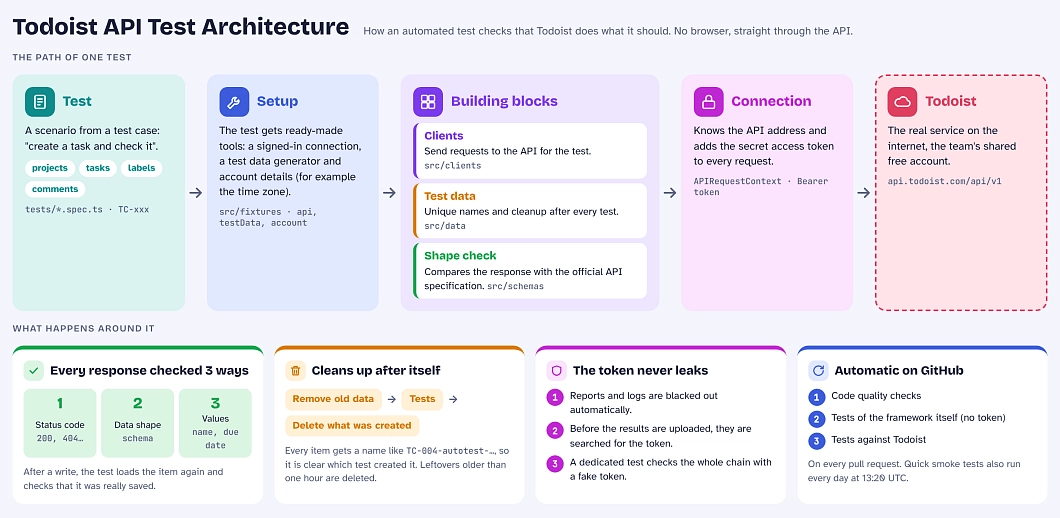
The quality of the test code is checked by a pipeline on every pull request: linting, formatting, type checking and unit tests for helper functions. We test our tests, too.
And, most importantly, code review. A test generated from a HAR file created a project that was not part of the recorded scenario. In the past, technical debt accumulated because something was not finished in time. Today, it accumulates because we do not read pull requests and simply merge them.
Once you are happy with the result, tell the agent: 'Save everything you have learned as a skill.' A skill is a Markdown file containing a procedure and common mistakes. Based on its description, the agent can recognise when to use it in a future session.
An example from the webinar: we gave our triage agent only the URL of a failed pipeline. It independently inspected the logs and artifacts and found that the problem was not a test failure, but a brief Todoist outage during data cleanup. It also prepared the text for a bug report.
Do you use MCP servers in the project?
We did not need them for this project. GitHub and Playwright provide command-line tools, and for Jira or Confluence, I call their APIs directly. This is faster and saves tokens.
How can you connect internal Swagger documentation within an organisation?
Claude Code runs on your computer, so it can access anything you can access. Just give it the URL.
Are you not concerned that AI has access to everything on your computer?
It is a risk you need to consciously decide whether to accept. I use paid versions with model training disabled, do not provide sensitive information, and ask the agent to present a plan before any non-trivial action. For sensitive systems, I use a service account with read-only access. There are also specialised tools and AI gateways that filter sensitive information before it is sent to the model provider.
Are all tests written in TypeScript?
Yes, all tests are written in Playwright and TypeScript. However, the same approach can also be applied to Python and other programming languages.
The framework repository on GitHub is public and can be used as a template. Click Use this template, and Claude will guide you through the setup based on README and CONTRIBUTING.md. We intentionally left one issue unimplemented so you can try the process yourself.
This article summarises the webinar held on 29 October 2026. You can watch the full recording on YouTube.
Would you like a similar workshop for your team, using your own application and the tools you already work with? The principles are the same whether you use Claude Code, Copilot or Codex. Find out how we can help with AI in Software Testing and Quality Engineering.
Don't miss out on the latest updates.
Fill in your email address to stay informed about upcoming training sessions, events, and testing know-how.

Don't miss the latest updates
Need Advice?
Request our free, non-sales consultation. Fill out the form and we will get back to you.
Watchdog
Did not find a date that works for you? ....
Notice